Overview Last updated: 26-MAY-2021 @ 08:07 PM

Fieldy SAAS and its Terminologies (Overview)
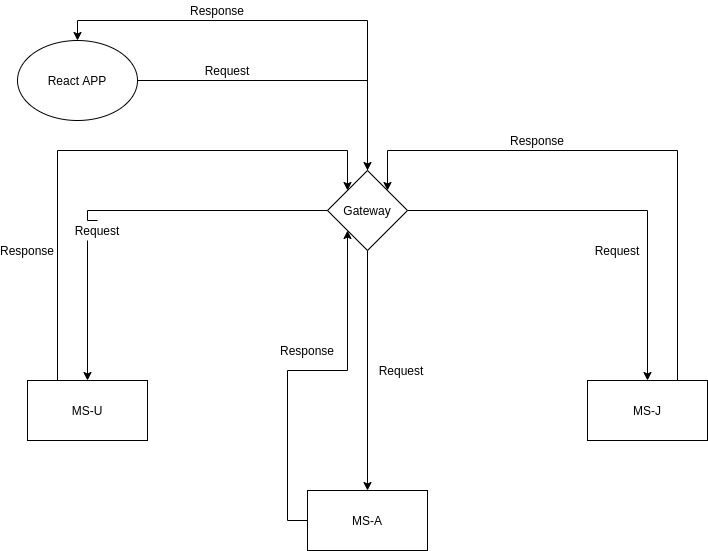
Our Fieldy Application process involves in three different terminologies.
1Front End - React application, gets the request from user and passes it to gateway.
2Gateway - Get the request from react application and passes it to Backend and passes back the response to react application.
3Backend - Gets the request from gateway and process it with database, gives response back.

Work Flow:

Micrservices Architecture

Application backend comprises of three Different Microservices which are connected in same database.

User Management Microservice
User Management Microservice herein after referred to as MS-U
1URL: http://devapi-saas.zaicrm.com/z1/api/
2Github Repo Url: https://github.com/mega-zaigo/zaiserve-api-saas
3Gateway Url: http://devapigateway-saas.zaicrm.com/z1/api/
Accounting Microservice
Accounting Microservice herein after referred to as MS-A
1URL: http://devaccounting-saas.zaicrm.com/z1/accounting/
2Github Repo Url: https://github.com/balazaigo/fieldy-saas-apiaccounting
3Gateway Url: http://devapigateway-saas.zaicrm.com/z1/accounting/
Job Microservice
Job Microservice herein after referred to as MS-J
1URL: http://devjob-saas.zaicrm.com/
2Github Repo Url: hhttps://github.com/balazaigo/fieldy-saas-apijobs
3Gateway Url: http://devapigateway-saas.zaicrm.com/z1/jobs/
Environments
Fieldy SAAS has two different Environments.
1Dev Environment
2QA Environment
Dev Environment
Developer Environment, where dev changes residing here. This environment is one, where Developers made some progress and those progress needs to be upto date. So that this environment may contains issues always.
React APP Url: http://devapp-saas.zaicrm.com or http://zaicrm.com
Gateway Url: http://devapi-gateway-saas.zaicrm.com/
MS-U Url: http://devapi-saas.zaicrm.com/
MS-A Url: http://devaccounting-saas.zaicrm.com/
MS-J Url: http://devjob-saas.zaicrm.com/
QA Environment
This environment is used to be a stable environment. Once the progress made in dev environment has been analysed by QA team manually and approved it, so that changes will comes to this environment, here automation has been taken care of.
React APP Url: http://qaapp-saas.zaicrm.com/
Gateway Url: http://qaapi-gateway-saas.zaicrm.com/
MS-U Url: http://qaapi-saas.zaicrm.com/
MS-A Url: http://qaaccounting-saas.zaicrm.com/
MS-J Url: http://qajob-saas.zaicrm.com/

Quick Overview

Both the above mentioned two environments has been setup with Devops, So it generate app necessities based on the commands which we have configured.
But before that a question which may arise How we are splitting up these environments? or Do we have two different repositories for Dev and Qa? - Answer is no.

No. of Repositories
We are maintaining one repository for both dev and qa. So what is the difference between them? how we are classifying it?
Behind the Scenes
1 Dev Environment directly points to the db which is mentioned in .env file in our api-saas repo or accounting or jobs repo.
2 QA Environment is one which is artificially configured. Server team clone our dev api repo into seperate project and config the database credentials which is created for QA.
So How we are running seeds irrespective to databases?
We are having two different types of commands which are introduced in our app project.
1. php artisan dev:db
2. php artisan qa:db
These above mentioned two commands which it runs the database migrations table and seeds for the respective environments.
But this qa:db command will wipe out the tables which are created, so whenever qa:db runs it will take the database configurations from config/database.php's qa_mysql array. So we've hardcoded db credentials for QA environment which it will run db related commands only on that particular project.
Hope we have covered about the application quick overview. Let's dive into the application folder structure.

Directory Structure of Routes, Controllers, Middleware

Routes
Routes(routes/api/) Two different directories we can found in routes/api
routes/api/System OnPremises and Fieldy SAAS Admin related routes (Not tenant's admin, this is purely managed by Zaigoinfotech in terms of SAAS)
routes/api/Tenant Route files which are residing inside in this directory is handling routes in regards to tenant specific actions.
Let's dive in deep
As for now there are few files which we need to look into it.
1.Authentication.php - Login related routes are handled here.
2.Company.php - Tenant's own company, Contractor and Vendor company related routes are handling here. (Menu in frontend is User, sub Menu is Companies)
3.Location.php - Get Countries states cities, but This location is somewhat we will be handling in upcoming phases.
4.MenuPermission.php - Which it will handles what are permissions are opted for the current logged in user has been handling here.
5.User.php - Tenant's Users and Contractor user related actions has been found here. (User Main menu and User Sub menu)
Please follow the same, Configure your Custom Route file in RouteServiceProvider and start using it. Please create new route file for module specific.
Controllers(app/Http/Controllers/)
Two different directories we can found in app/Http/Controllers
app/Http/Controllers/Api/SystemWhich it is the backend application of our Fieldy Saas. It works well in onpremises.
app/Http/Controllers/Api/TenantActions which are handling inside this Controller directory is only tenant specific.
As described in Tenant Routes, inside app/Http/Controllers/Api/Tenant also deals with Menu based controller files,
1.Authentication - Login Related actions has been handled here, Reset password, forgot password etc also handled here.
2.MenuPermissions - MenuPermissions which it will gives the Menus and Permissions details for the current logged in user.
3.TenantCompany - Tenant specific related actions are handled here, like updating tenant company information etc.,
4.User - We will be handling all User Module related actions here such as, Tenant's User Listing, Contractor Company and vendor company related cruds are handled here.
Note: Please create directory based on the Menu's which are provided in frontend it is easier to navigate further.
Middleware - app/Http/Middleware/
We don't have majority of middlewares to dealt with it.
JWT Middleware is one which it handles all authentication menu permission related actions has been handled.

Requests, Resources, Helpers

Requests (app/Http/Requests/Tenant)
which handles fieldy saas tenant related Request validations.
Tenant/Frontend/CompanyWhich it will handles validation related to the Company Specific, such as Vendor company, Tenant Company
Tenant/Frontend/UserWhich it will handles user listing, detailed profile such as Task creation etc, in user module which it will be handled here.
Dev who ever working on the validations of their respective modules, they need to create thier validation files under Tenant/Frontend/ and please mention the name as related to your controller functions.
Resources (app/Http/Resources)
What is this resource files? Resources files are one which it will alters our json response as per our convenient. Please Use Resource File then and there so that we can easily alter our json response as per our convenient.
In this directory there isn't any sub directories are there, in case if you need any subdirectory please include that here as well.
Quick Tip: Please refer further things about resources here
Helpers (app/Helpers)
Our Fieldy application helpers are needs to be comes under fieldyhelper, in case if there is more functions there and code is sets to bulky, please create a new file and include it in composer.json.
Note: Use fieldyhelper.php and helper.php for onpremise and zaigoinfotech related operations.

Events, Traits, Rules, Services, Repo, Model

Events (app/Events app/Listeners)
As Devs working on laravel has been aware of it, that is events and listeners will residing inside the above mentioned directories.
Note: use specific names as are related to your model actions. Such as FieldyUserCreated etc.,
Traits (app/Traits)
File Upload has been handled here, please go through this one.
Rules (app/Rules)
Custom Rules in regards to validation has been handled here.
In terms of TenantUnique Validation you need to use the TenantUniqueValidation rule across the application. It needs table name and custom wheres where you can add where conditions more than tenant and any other columns.
Note: use specific names as are related to your model actions. Such as FieldyUserCreated etc.,
Services (app/Services/Tenant/)
1.CustomerGroupService - Which it will deals with ContractorCompany, VendorCompany, TenantCompany etc., so in future CustomerCompany and CustomerContact related services has been handled here.
2.TaskService- Any logic which involves tasks are needs to be handled here, as for now we will be handling only tasks which are related to User Specific task now.
3.UserService - Tenant's user and Contractor User creation has been handled here.
Note: Controller connects to Services, Services connects to Repository, repository connects to Model.
Repositories (app/Repository/)
Click here to study briefly
This Repository Directory will be connects with Model, so each and everythingn which connects to database needs to be connect with Model, model only connects to database and bounces back with data.
Repository Model binding will communicate with Relations.
In case if repository needs to connect with relations is in the sense, please use Relationable Trait, and define a setRelations property, so that you can have the relations array.
Each Repository should have descriptive name. May be it relates to model or it should be related to the respective module.
Model (app/Model/Tenant/)
This above mentioned directory deals with Tenant related model specific actions. As we have already used User Module in onpremises and tenant's admin(Zaigoinfotech) hence it is moved to app/Model/System. These are all about the fieldy workflow.
Seeders (database/seeders/)
Database seeders are often used by Developers. So while creating new database seeders make sure that it should create once if data isn't available. Please refer further database seeders in our application, So that you can get the reference of updateOrCreate method.
Observers (app/Observers/)
Observers are most importantly used for whenever Model event occurs we need to run set of process to taken care of. In our Fieldy, we will be using Observers, Whenever new tenant is getting created, we will be creating a user with the tenant details and make him/her as admin.
GIT Best Practices
Developers should follow this practices on every module and every task which they are handling.
1.Create a Branch, Developers no one shouldn't allowed to work in master/main branch directly. MS-U root branch is master. MS-A and MS-J root branch is main.
2.In case if your changes are in progress is in the sense please mark it as WIP in your git message.
3.Commands needs to be run in the phase needs to mentioned in comment.
4.Commands required to run in Dev environment needs to be include in dev:db, as same as dev qa:db also needs to included with command in case if needed.
5.Once after your progress has been done in the branch. Please give us pull request, and in case pull request already given, please mention the respective reviewer or developer in github comment so that they can get notified.
6.Your reviewer can comment if it is okay to merge or they can directly merge if they want.
7.Once after it is merged with root branch, you can expect your coding in dev environment.
8.In case if any commands needs to be run or failed to run, please recommit it in same branch if it isn't merged, in case merged please create a branch called {your_branch_name}_missing_necessities.
9.Once after your command run and everything in your branch is fits accurately with root branch is in the sense, you can delete your branch then and there.
10.Create a branch for your each and everymodule, it is better to create a branch for the submodule as you needed.
11.Test your api before give merge request.
12.Commit message should be descriptive, each and every commit message will be monitored at any point of time, your commit messages can give notification to management in slack channel at anytime.
Quick Tip: Log your request api then and there in telescope, in local telescope maynot works. so you can do a quick hack such as copy your index.php file and paste it as server.php in root directory. Give php artisan serve Before that please give ASSET_URL in .env with your localhost project url along with public path with in it. so that you can run your telescope in local url.
Note: Telescope server.php should not committed in our dev server.
In case if your code set needs to run composer update Please let Server team or your TL to get this done.